By
By 
Author: Olivier de Turckheim, Solution Architect & Customer Success Manager, Cycloid
Bio: As the Solution Architect & Customer Success Manager at Cycloid Olivier wears many hats, taking on the role of solution architect, customer success manager and even product marketer when needed. A tech at heart, Olivier can apply his experience gained in large organisations like Ericsson, as well as start-ups, and testify to what true DevOps and Developer Experience mean for different companies and circumstances.
96% of organizations used Kubernetes in 2023, up from 83% in 2020, according to CNCF’s 2022 survey. While cloud deployments dominate most discussions, many companies still run Kubernetes on-premise for compliance, cost control, and security. However, managing Kubernetes on your own infrastructure comes with a lot of challenges.
📹 Going on record for 2026? We're recording the TFiR Prediction Series through mid-February. If you have a bold take on where AI Infrastructure, Cloud Native, or Enterprise IT is heading—we want to hear it. [Reserve your slot
Cloud providers take care of scaling and maintenance, but on-premise environments require precise hardware planning. Organizations must decide how many servers to procure, what configurations to choose, and how to allocate resources efficiently to handle peak and fluctuating workloads.
Without careful planning, servers run below capacity, wasting power and space. This drives up costs and adds complexity. Kubernetes helps by dynamically placing workloads and balancing resources, but only when deployed with a strategy that accounts for scaling limits and hardware constraints.
The Case for On-Premise Kubernetes
Kubernetes enables organizations to orchestrate workloads on-premise, but running it outside the cloud introduces challenges that teams don’t typically deal with in managed environments. In the cloud, infrastructure is abstracted – scaling, provisioning, and network management happen behind the scenes. On-premise, organizations must now take on those responsibilities, managing everything from hardware constraints to lifecycle operations.
Before looking at how Kubernetes improves on-premise efficiency, it’s important to understand the unexpected operational burdens that organizations face when bringing cloud-native tooling to their own infrastructure.
Common Challenges in On-Premise Setups
Managing on-premise infrastructure is not easy. Many organizations struggle with:

Without automation, workloads remain tied to specific servers, creating an imbalance in resource usage. Some machines run at full capacity while others stay underutilized. Unlike the cloud, where you can scale up or down instantly, on-premise infrastructure requires upfront hardware purchases. If demand spikes and no spare servers are available, scaling up isn’t an option without procuring and setting up new hardware – a process that takes time and money.
Tools like OpenShift provide an enterprise-grade Kubernetes distribution with built-in automation and multi-cluster management, making scaling and lifecycle management easier for on-premise deployments.
Making Better Use of Existing Hardware
Cloud services let organizations scale up when needed and scale down when demand drops. On-premise systems don’t work like that. This means organizations must strike a balance between utilization and performance to get the most out of their existing hardware.
Instead of adding more servers, companies should focus on using their existing hardware wisely before thinking about scaling. But using a server fully doesn’t mean pushing it to 100% capacity. If CPU or memory is maxed out, systems slow down, applications lag, and servers can become unresponsive. The goal is to keep workloads balanced; using resources efficiently while leaving enough room for the system to run smoothly.
How Poor Resource Use Wastes Money
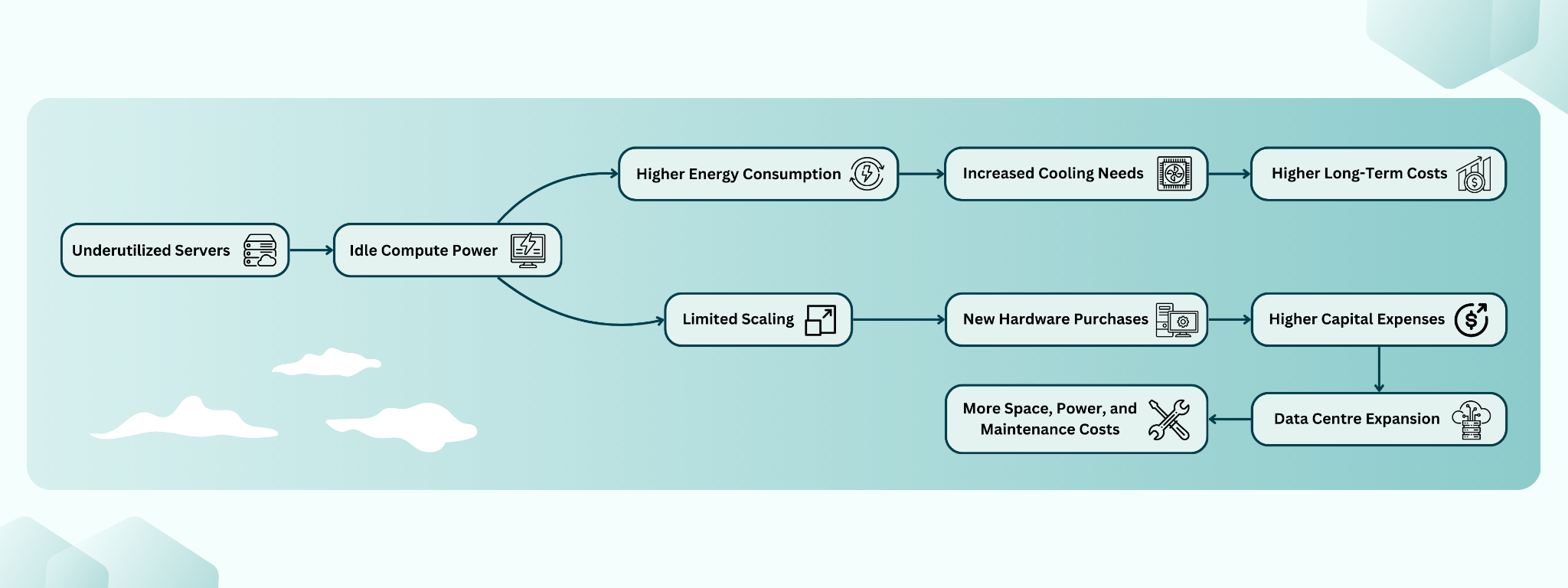
With better workload scheduling, organisations can reduce idle capacity and avoid buying extra servers too soon.
Optimizing On-Premise Infrastructure with Kubernetes
Kubernetes is built to dynamically allocate resources, meaning workloads run where they are needed instead of being tied to specific machines. This flexibility helps organizations get the most out of their existing infrastructure instead of constantly expanding it.
Better Resource Use
Kubernetes schedules workloads based on actual demand instead of fixed allocations. But not all workloads can run anywhere – some need GPUs, some require specific hardware, and some should be isolated. Kubernetes handles this with node labeling and affinity rules, making sure workloads run where they should while still making the best use of available resources.

How Kubernetes Schedules Workloads Efficiently

Kubernetes balances workloads in real time to optimize CPU, memory, and storage, but not everything can move freely. Stateless apps can be rescheduled easily, but databases and other stateful services need careful planning since they can’t migrate without downtime. Unlike VMware, which supports live VM migration, Kubernetes requires a different approach for workloads that need to stay running without interruption.
For on-premise setups with limited resources, lightweight distributions like K3s work well since they need fewer dependencies and run efficiently on smaller machines.
Less Manual Work
Managing on-premise hardware takes time. With Kubernetes:
- Auto-recovery: If a server goes down, workloads move automatically – if there are spare resources available.
- Auto-scaling: Applications get more resources when needed, but scaling depends on properly configured thresholds and policies for each workload.
- Rolling updates: Apps can be updated with no downtime in many cases, but database migrations or complex infrastructure changes may still require planned downtime, as seen even in large-scale environments.
Lower Power Use and Longer Hardware Life
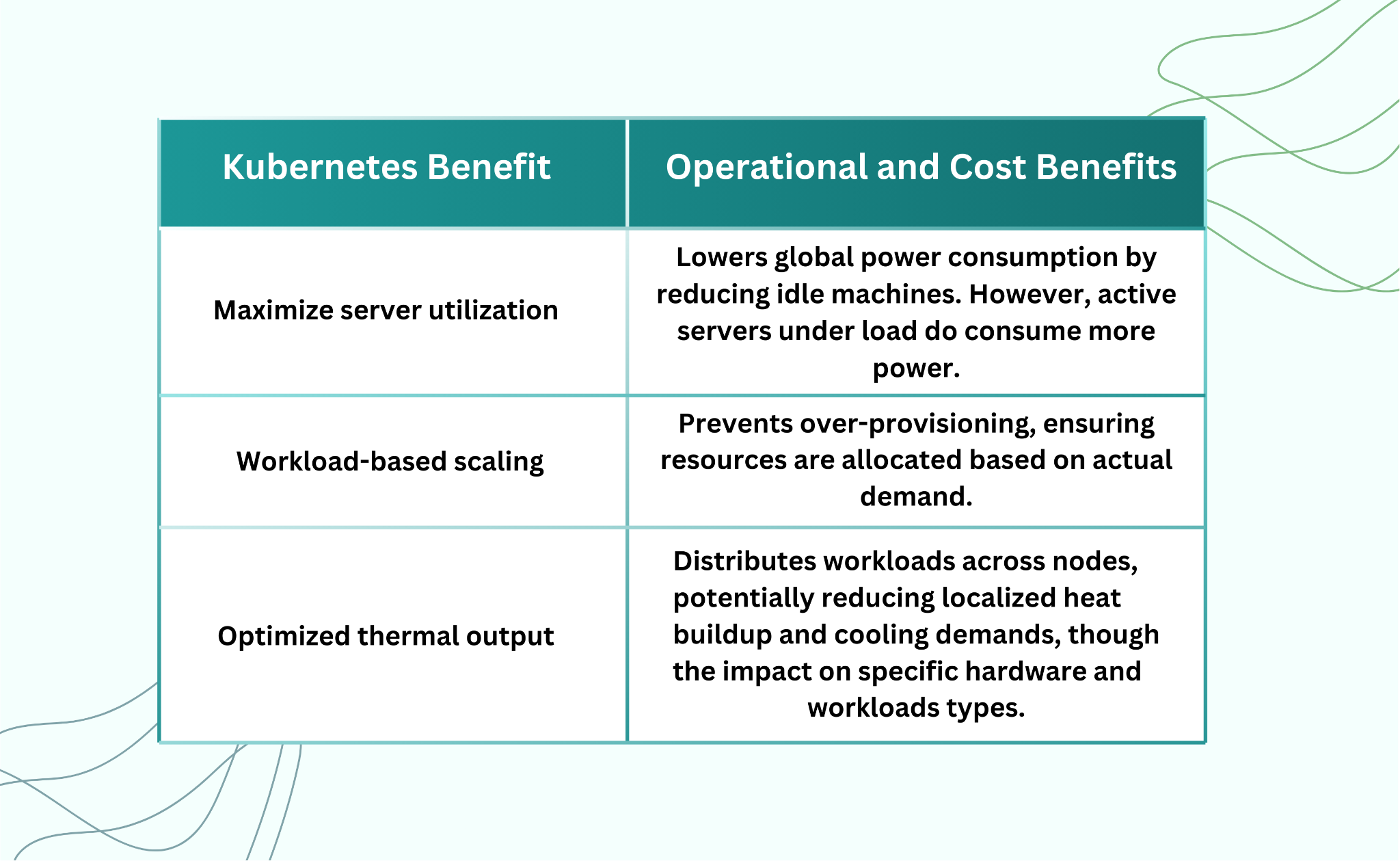
Efficient resource allocation reduces the number of active servers, lowering overall power consumption and slowing hardware degradation. By distributing workloads effectively, Kubernetes helps organizations optimize power usage and extend infrastructure lifespan – but this depends on real workload patterns.
Making On-Premise Kubernetes Work
Now setting up Kubernetes on-premise is only the first step – keeping it efficient and scalable over time is the real challenge. Many organizations struggle with resource visibility, workload automation, and cluster scaling, leading to operational overhead and inefficient hardware use.
In cloud environments, Terraform and Pulumi provide IaC capabilities to manage infrastructure consistently and at scale. However, on-premise environments often require additional tools to handle configuration management and automation. Tools like Ansible, Chef, and Puppet play an important role in provisioning, maintaining, and updating on-premise Kubernetes infrastructure. Ansible is widely used for automating package installations, configuring network settings, and deploying Kubernetes components, while Chef and Puppet provide policy-based automation to enforce infrastructure consistency across bare metal and virtualized environments.
How Platform Engineering Improves On-Premise Kubernetes
On-premise Kubernetes requires more than just cluster deployment – it demands ongoing management to ensure stability and efficiency. Platform engineering simplifies Kubernetes operations by automating routine tasks, enforcing standard configurations, and providing a unified management layer for better control over resources.
Platform Engineering improves operational efficiency by:
- Automating resource provisioning – Allowing developers to allocate compute, memory, and storage without manual intervention, reducing wait times and operational delays. More importantly, it simplifies the process—developers don’t have to write Kubernetes manifests, manage Helm charts, or interact with the Kubernetes API directly.
- Standardizing cluster configurations – Enforcing uniform infrastructure policies across nodes and clusters to minimize configuration drift and security risks.
- Centralizing resource visibility – Offering a single-pane view of Kubernetes workloads, making it easier to track usage, detect inefficiencies, and optimize resource distribution.
Making Kubernetes Easier to Use
Setting up and maintaining Kubernetes on-premise is more complex than in the cloud, mainly due to infrastructure management, upgrades, and hardware constraints. However, once deployed, Kubernetes itself operates the same way in both environments.
Platform Engineering can help by:
- Making it easy for developers to request resources – Abstracting complexities through self-service workflows.
- Providing a central view of all Kubernetes objects – Managing pods, deployments, and services across clusters.
- Helping clean up unused workloads – Identifying and removing idle resources to optimize utilization.
The challenge isn’t just running Kubernetes – it’s ensuring smooth operations, maintaining updates, and keeping clusters scalable and efficient over time.
Organizations implementing platform engineering practices can improve on-premise Kubernetes efficiency, reduce operational overhead, and make resource management more predictable.
How Companies Save Money
Many companies unknowingly run unused workloads – applications that use resources but aren’t actually needed. Kubernetes can help track and remove these:
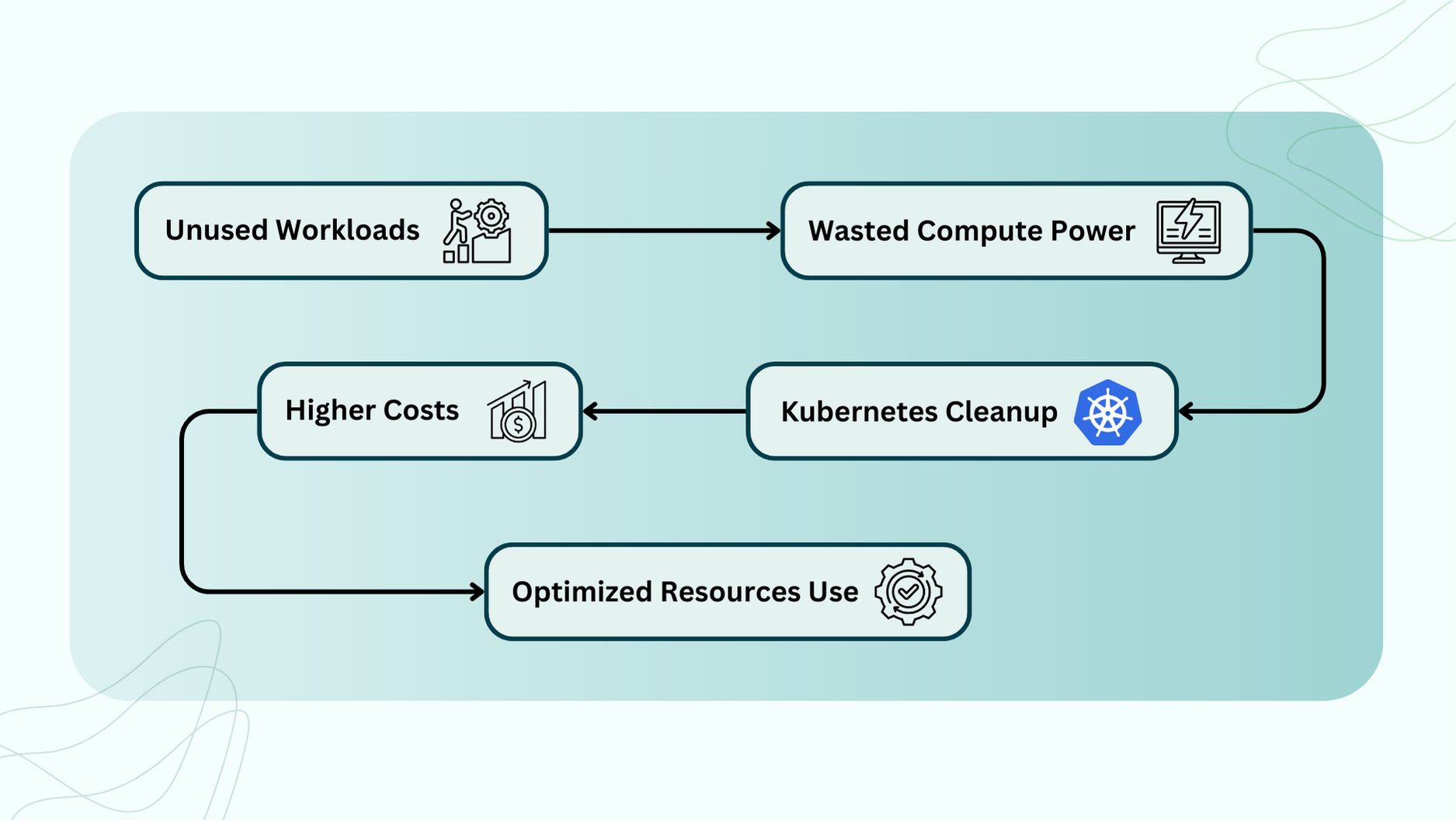
By using better monitoring and automation, companies have seen:
- 20-30% lower infrastructure costs by shutting down unused resources.
- Faster workload deployment without over-provisioning hardware.
- Lower energy use by optimizing server efficiency.
Conclusion
On-premise Kubernetes is about maximizing existing hardware, not just avoiding the cloud. Poor resource allocation increases costs and complexity. With proper scheduling, active management, and automation, Kubernetes optimizes infrastructure, reduces overhead, and extends hardware lifespan.